GATE10の使い方 1 ~インストールとテスト実行~


今日は最近使っているGATE10について、紹介記事を書いていきます。インストールからテスト実行までです。
※本記事の内容は本家のREADME.mdの内容になります。
GATEはGeant4のラッパーのような立ち位置で、結構長い歴史があります。
数年前にGATE10がリリースされ、これまでのマクロベース(GATE 9.XX以前)とは大きく異なり、Pythonベースでシミュレーションを記述するスタイルへと移行しました。
Pythonで制御できるようになったことで、可読性や拡張性が大きく向上しています。
環境はWindows, MacOS, Linuxのどれでもいいのですが、今回は、環境差によるトラブルを極力減らすことを目的として、GATE 9.XX以前と同じ考え方で環境を統一していく(Virtual Boxを使う)方針をとります。分かる人はそれぞれの方法でやってください。
※Windowsはマルチスレッディング・可視化の機能が一部使えないとか
Virtual Box用のイメージファイル(vGATE 9.4.1)は15GB以上あるのでダウンロードが大変です。ダウンロード速度の出る環境で、ダウンローダー等を使うことをお勧めします。
仮想マシンのストレージは初期設定の40GBだと足りないので120GBくらいは確保しておいた方がいいと思います。後から変更する場合には、こちらを参考にしてください。
Virtual Boxを起動しましたら以前の記事を参考に日本語入力・キーボード設定を済ませておいてください。(設定からキーボード、地域 あたりを手当たり次第に日本語に設定するといいと思います。)。あと、VirtualBoxのメニュー>デバイスからGuest Additionsも入れておいてください。
まず必要なパッケージを入れます。
sudo apt update
sudo apt install -y python3-venv python3.10-venv
次にGATE10を使う仮想環境を作りましょう。さらにactivateします。
cd ~/Software/
mkdir Gate10
cd Gate10
python3.10 -m venv opengate_env
source opengate_env/bin/activate
こんな感じで(opengate_env)という表示になっていればOKです。
では本体opengate(GATE10)を入れましょう。
pip install --upgrade pip
pip install opengate
あと、上級者の使い方としてPyTorchとgaga-phspを使う機能がありますの。これらは自動インストールされないので以下のコマンドでインストールしておきます。
※現時点で必須ではないです。
pip install torch
pip install gaga-phsp
終わったら以下を実行して、正しく動作することを確認しましょう。初回だけ大容量のデータ(Geant4関連)をダウンロードすることになります。Virtual Boxの初期設定のストレージ40GBだと、ここで詰まります。
opengate_testsとりあえず、ここまで完了すればインストールはOKです。
具体的なコードなどを実行して説明していきます。
以下は本家のtest004_simple.pyを元とさせてもらっています。
https://github.com/OpenGATE/opengate/blob/master/opengate/tests/src/misc/test004_simple.py
ただし、初学者が基本的なシミュレーション構成を理解しやすいよう、テストフレームワークに依存する部分を削除して、最小限のコード構成にしています。
gedit theme00_my_first_test.pyとして以下をコピペ、保存してください。
#!/usr/bin/env python3
# -*- coding: utf-8 -*-

from opengate.managers import Simulation
from opengate.utility import g4_units

# Simulationオブジェクトの作成
sim = Simulation()

# 単位の定義
m = g4_units.m
cm = g4_units.cm
keV = g4_units.keV
Bq = g4_units.Bq

# Worldボリュームのサイズ設定
world = sim.world
world.size = [ 3*m, 3*m, 3*m ]
world.material = "G4_AIR"

# 水ファントムの追加
waterbox = sim.add_volume("Box", "Waterbox")
waterbox.size = [40 * cm, 40 * cm, 40 * cm]
waterbox.translation = [0 * cm, 0 * cm, 25 * cm]
waterbox.material = "G4_WATER"

# ガンマ線源の追加
source = sim.add_source("GenericSource", "Default")
source.particle = "gamma"
source.energy.mono = 80 * keV
source.direction.type = "momentum"
source.direction.momentum = [0, 0, 1]
source.n = 200000

# 統計情報アクターの追加
stats = sim.add_actor("SimulationStatisticsActor", "Stats")
stats.track_types_flag = True

# シミュレーションの実行
sim.run()

# 結果の表示
print(stats)
python3 theme00_my_first_test.pyにて実行します。
これを実行した結果が以下です。
imulation: create RunManager (single thread)
Simulation: initialize Geometry
Simulation: initialize Physics
Simulation: initialize Source
Simulation: initialize G4RunManager
Simulation: initialize PhysicsEngine after RunManager initialization
Simulation: initialize actors
Simulation: check volumes overlap
--------------------------------------------------------------------------------
Simulation: START
Simulation: STOP. Run: 1. Time: 2.1 seconds.
--------------------------------------------------------------------------------
runs                1
events              200000
tracks              205367
steps               1393058
init                555.919 ms
duration            1.59346 s
pps                 125512
tps                 128881
sps                 874233
start_time          Mon Jan 26 16:08:18 2026
stop_time           Mon Jan 26 16:08:20 2026
sim_start_time      0.0 ps
sim_stop_time       1.0 s
threads             1
arch                Linux
python              3.10.12
track_types
                        e-: 5365
                        gamma: 200002
エネルギーを80keVから511keVに変更してみましょう。
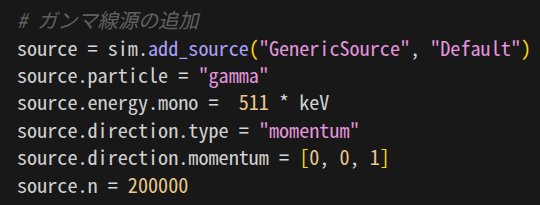
そうすると結果は以下のようになりました。
Simulation: create RunManager (single thread)
Simulation: initialize Geometry
Simulation: initialize Physics
Simulation: initialize Source
Simulation: initialize G4RunManager
Simulation: initialize PhysicsEngine after RunManager initialization
Simulation: initialize actors
Simulation: check volumes overlap
--------------------------------------------------------------------------------
Simulation: START
Simulation: STOP. Run: 1. Time: 2.5 seconds.
--------------------------------------------------------------------------------
runs                1
events              200000
tracks              268230
steps               1837602
init                519.865 ms
duration            1.93761 s
pps                 103219
tps                 138433
sps                 948384
start_time          Mon Jan 26 16:17:41 2026
stop_time           Mon Jan 26 16:17:43 2026
sim_start_time      0.0 ps
sim_stop_time       1.0 s
threads             1
arch                Linux
python              3.10.12
track_types
                        e-: 67443
                        gamma: 200787
二次電子の数、それらの追跡(tracks)が大きく増加しているのが分かります。
このほかにも色々と変えて、理解を深めてください。